
A digital version of our National ID is now available online—and yes, it can be used as valid proof of identification. Starting today, registered individuals in the Philippine Identification System (PhilSys) should be able to access their digital National ID by visiting the official website or using the eGOV mobile application. The process requires users to enter their demographic information and undergo facial verification.
"With these developments, every registered Filipino now has improved access to a reliable and secure proof of identity that can be easily authenticated on their devices," PSA Undersecretary Claire Dennis Mapa said in a statement.
Previously, the digital National ID could only be issued by PhilSys Registration Centers, meaning that you had to go to one. This digital-to-print version has been the alternative to the (lack of) physical IDs since 2022.
As of April, the PSA reported that they have delivered over 50 million of the 87 million National IDs to registered persons across the country, which means there are still 37 million left waiting for theirs to arrive. The government initially said the delivery of the National IDs may take up to six months upon registration, but others have been waiting years.
How to Access Digital National ID
You can access your digital National ID in three easy steps:
1. Go to https://national-id.gov.ph/.
2. Fill out the form with your full name and date of birth.
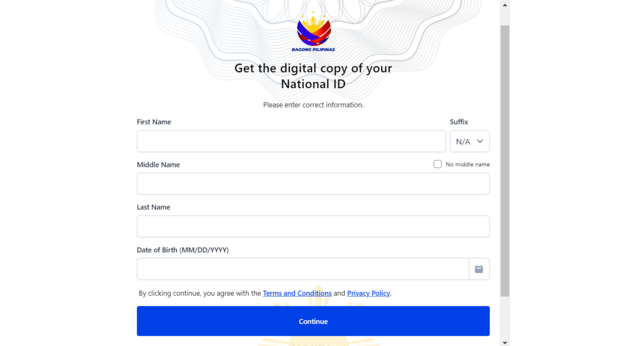
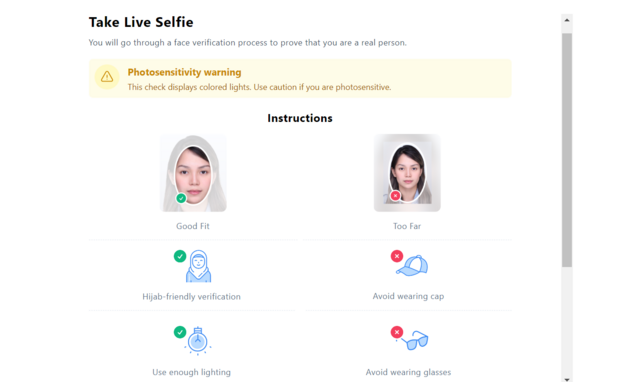
3. Take a live selfie using your device camera “to prove that you are a real person.”
Make sure to have enough lighting for this step. Avoid wearing caps or sunglasses as well. Going through this step means you allow the PSA's collection, use, and disclosure of your personal data for identity verification and safety purposes.
Do note that the PSA server may be down at times (it being newly launched and all), but you can try again in a few hours to check.
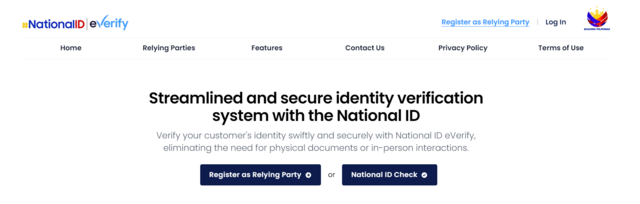
In addition to the digital National ID, the PSA has also introduced the National ID Check and National ID eVerify systems at /everify.gov.ph, which employers, companies, and government agencies can use to verify your National ID.
*This story originally appeared on Spot.ph. Minor edits have been made by the Preview.ph editors.
Hey, Preview readers! Follow us on Facebook, Instagram, YouTube, Tiktok, and Twitter to stay up to speed on all things trendy and creative. We’ll curate the most stylish feed for you!
